本記事は
執筆デビューWeek
4日目の記事です。
✨
3日目
▶▶ 本記事 ▶▶
5日目
🔰
はじめまして。執筆デビューWeek 4日目を担当します、櫻庭です。
はじめに
みなさんはレストランを探すときはどのようにお店を探しますか?
食〇ログでしょうか?それともぐ〇なびですか?
私は最近、Google Mapを使用して調べることが多くなってきています。
(グルメサイトにはない店舗を見つけられたり、ぱっと現在地近くのお店を調べられたり出来るのでおすすめです。)
しかしながら探せるお店が多い分、良いお店を探そうと星5や星4の高評価のお店を見てみると評価件数が1とか3とかがあり、その評価を信頼していいかどうか判断が難しいことがあります...。
そこで評価件数(口コミ件数)でフィルターをかけて「良いお店を探しやすくしよう!」というのが本記事の目的です。
前準備
Google Maps Platformの利用登録
今回はGoogleさんが提供しているGoogle Map Platformを使用します。
※APIを呼び出すごとに課金されます。(詳しくはこちら)
※現在(2022/11/16時点)は月額200ドル利用分まで無料だそうです。
Googleのアカウント登録やGoogle Maps Platformのスタートガイドを済ませ、APIキーを発行します。
使用するAPIについて
今回使用するAPIを軽く説明します。
Nearby Search
今回メインで使用するAPIです。
指定した範囲内の場所に対してキーワードやタイプを指定して検索をすることができます。
今回は飲食店を探したいのでタイプはrestaurantに固定してますが他にもいろいろあります。
aquarium(水族館)やgas_station(ガソリンスタンド)、果てにはcar_wash(洗車)もありますね...笑
このAPIで返却された結果を用いて評価件数によるフィルターをかけます。
Geocoding
テキストから地理座標または地理座標から人が読める最も近い住所を取得するのに使います。
(例: 「東京駅」→ 緯度 35.6812362、経度 139.7671248)
今回は「テキストから地理座標」を取得し、その情報を元にNearby Searchによる範囲検索を行います。
Map
その名の通り地図を描画するためのAPIです。
検索した範囲を表示するのに使用します。
実装
上記の準備ができたら実装していきます。
ソースコード全文は末尾に記載いたしますのでここでは重要な部分のみ説明します。
まずはMaps JavaScript APIを読み込みます。
<script async defer src="https://maps.googleapis.com/maps/api/js?key=XXXXXXXXXXXX&libraries=places&callback=initMap"></script>
key=XXXXXXXXXXXXのXXXXXXXXXXXXは取得したAPIキーに置き換えてください。
今回はプレイスライブラリを使用するのでlibraries=placesを記載します。
次に検索を実行したときの動作を説明していきます。
まず取得したいのは検索したい場所の緯度経度情報です。 今回はテキスト検索と現在地検索の2パターン用意したのでそれぞれ見ていきます。 テキスト検索の場合 上記で説明したGeocodingを使用して緯度経度情報を取得していきます。
/** 場所の緯度経度取得
 * @param locationName: string 場所名
 * @returns 緯度経度情報
 */
async function getLocation(locationName) {
  const geocoder = new google.maps.Geocoder();
  const geocodeRes = await geocoder.geocode({ address: locationName }).catch(() => alert('場所の位置情報が取得できませんでした。'));
  return geocodeRes.results?.[0]?.geometry.location;
}
現在地検索の場合 Geolocation APIを使用して現在地の緯度経度情報を取得します。
/** 現在地取得 */
function getCurrentLocation() {
  if (navigator.geolocation) {
    navigator.geolocation.getCurrentPosition(
      (position) => {
        const pos = {
          lat: position.coords.latitude,
          lng: position.coords.longitude,
        };

        document.getElementById("currentLocation").innerText = `${pos.lat}, ${pos.lng}`;
      },
      e => {
        document.getElementById("currentLocation").innerText = `現在地取得失敗`;
        console.error("navigator.geolocation Error: ", e);
      }
    );
  } else {
    document.getElementById("currentLocation").innerText = `現在地取得失敗`;
    // Browser doesn't support Geolocation
    console.error("Browser doesn't support Geolocation");
  }
}
続いてマップの作成です。
const map = new google.maps.Map(document.getElementById('map'), {
  center: location,
  zoom: 15
});
表示するHTMLElementを指定し、マップの中心点は先ほど取得した緯度経度情報(location)にします。
最後に付近のお店を検索していきます。
/** 付近の店検索
 * @param map: Map googleMapインスタンス
 * @param location: string 緯度経度文字列
 * @param word: string 検索ワード
 * @param radius: number 検索範囲
 */
async function searchNearBy(map, location, word, radius) {
  const placeService = new google.maps.places.PlacesService(map);
  placeService.nearbySearch({
    location,
    radius: `${radius}`,
    keyword: word,
    type: ['restaurant'],
  }, showResults);
}
placeService.nearbySearchで検索を始めます。今回は飲食店に絞るためtype: ['restaurant']を指定しています。
そしてshowResultsでnearbySearchした結果をソート、フィルター、整形を行っています。
nearbySearchでは最初20件しか情報が返ってきません。2秒ごとにpagination.nextPage()をして20件*3回=60件(最大取得件数)を取得しています。
setTimeout(() => { pagination.nextPage(); }, 2000);
取得が終わったら本題のフィルターをかけていきます。
const filteredResults = mergedResults.filter(result => result.user_ratings_total >= numberOfReviews);
nearbySearchの結果にuser_ratings_totalという口コミ件数があるのでそれを検索時に設定した値と比較してフィルターをかけます。
フィルター後、口コミ評価順にソートしてHTMLに反映させます。
filteredResults.sort((x, y) => {
  if (x.rating < y.rating) return 1;
  if (x.rating > y.rating) return -1;
  return 0;
});

const resultsHtml = filteredResults.map(result => {
  return `<li><span>[${result.rating.toFixed(1)}(${result.user_ratings_total})] </span><a href="https://maps.google.co.jp/maps?q=${encodeURIComponent(result.name + ' ' + result.vicinity)}&z=15&iwloc=A target="_blank">${result.name}</a></li>`
});

document.getElementById('results').innerHTML = `<ol>${resultsHtml.join('')}</ol>`;
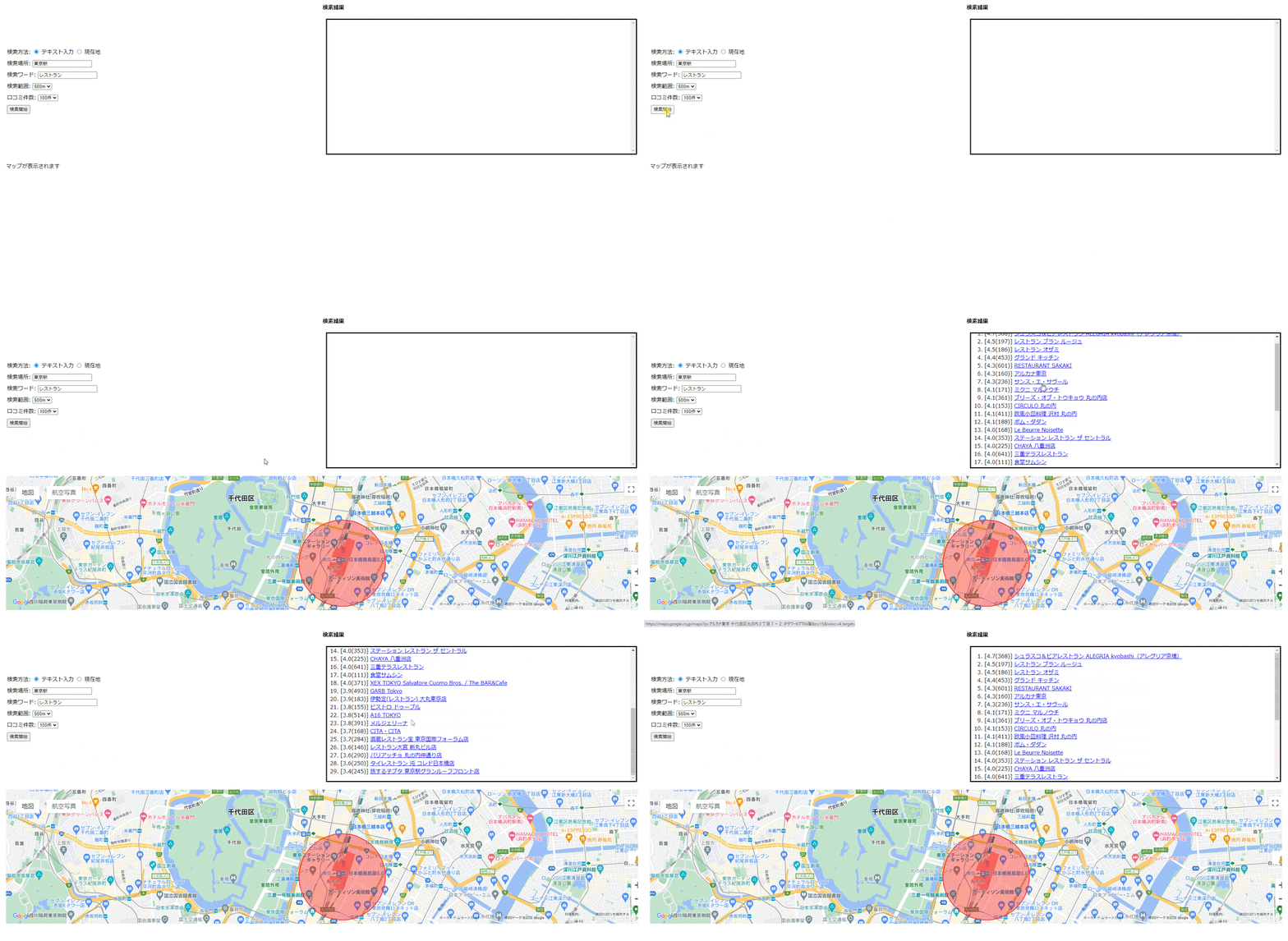
これでGoogleMapに表示されるお店を口コミ件数でフィルターをかけて良いお店を探しやすくなりました。
最後に
今回はGoogle Maps Platformの付近のお店を検索するAPIを使い、結果をフィルターすることである程度の口コミ件数があるお店を調べることができました。 みなさんも是非実装して使ってみてください!
全コード
<head>
  <meta charset="UTF-8">
  <style type="text/css">
    div {
      margin: 10px;
    }
  </style>
  <script async defer
    src="https://maps.googleapis.com/maps/api/js?key=XXXXXXXXXXXX&libraries=places&callback=initMap"></script>
  <script src="sample.js"></script>
</head>

<body>
  <main role="main">
    <section>
      <div>
        <div>
          <span>検索方法: </span>
          <input type="radio" name="serchMethod" id="radioText" value="text" checked onchange="selectText()">
          <label for="radioText">テキスト入力</label>
          <input type="radio" name="serchMethod" id="radioCurrent" value="current" onchange="selectCurrent()">
          <label for="radioCurrent">現在地</label>
        </div>
        <div>
          <span>検索場所: </span>
          <input type="text" id="location" value="東京駅">
          <span id="currentLocation"></span>
        </div>
        <div>
          <span>検索ワード: </span>
          <input type="text" id="serachWord" value="レストラン">
        </div>
        <div>
          <span>検索範囲: </span>
          <select id="radius">
            <option value="300">300m</option>
            <option value="500" selected>500m</option>
            <option value="800">800m</option>
            <option value="1000">1km</option>
            <option value="2000">2km</option>
          </select>
        </div>
        <div>
          <span>口コミ件数: </span>
          <select id="numberOfReviews">
            <option value="10">10件</option>
            <option value="50">50件</option>
            <option value="100" selected>100件</option>
            <option value="200">200件</option>
            <option value="300">300件</option>
            <select>
        </div>
        <div>
          <button onclick="search()">検索開始</button>
        </div>
      </div>
      </div>
      <td style="width: 50%;">
        <h4>検索結果</h4>
        <div id="results" style="border: solid; height: 400px; overflow-y: scroll;"></div>
      </td>
      <div id="map" style="height:400px;">マップが表示されます</div>
    </section>
  </main>
</body>
/** 検索結果 */
let mergedResults;

/** 初期表示 */
function initMap() { }

/** テキスト入力選択 */
function selectText() {
  document.getElementById("location").disabled = false;
}
/** 現在地選択 */
function selectCurrent() {
  document.getElementById("location").disabled = true;
  getCurrentLocation();
}

/** 検索 */
async function search() {
  // 初期化
  mergedResults = [];
  document.getElementById('results').innerHTML = '';

  // 緯度経度情報取得
  let serachMethod;
  document.getElementsByName('serchMethod')?.forEach(item => {
    if (item.checked) {
      serachMethod = item.value;
    }
  });
  const locationText = document.getElementById("location").value;
  const currentLocationText = document.getElementById("currentLocation").innerText;
  const location = serachMethod === 'text' ? await getLocation(locationText) : getPos(currentLocationText);

  // mapの作成
  const map = new google.maps.Map(document.getElementById('map'), {
    center: location,
    zoom: 15
  });

  // 付近の店検索
  const word = document.getElementById("serachWord").value;
  const radius = Number(document.getElementById("radius").value);
  searchNearBy(map, location, word, radius);

  const searchCircle = new google.maps.Circle({
    strokeColor: "#FF0000",
    strokeOpacity: 0.8,
    strokeWeight: 2,
    fillColor: "#FF0000",
    fillOpacity: 0.35,
    map,
    center: location,
    radius: radius,
  })
}

/** 場所の緯度経度取得
 * @param locationName: string 場所名
 * @returns 緯度経度情報
 */
async function getLocation(locationName) {
  const geocoder = new google.maps.Geocoder();
  const geocodeRes = await geocoder.geocode({ address: locationName }).catch(() => alert('場所の位置情報が取得できませんでした。'));
  return geocodeRes.results?.[0]?.geometry.location;
}

/** 緯度経度情報取得
 * @param posStr: string 緯度経度文字列
 * @returns 緯度経度情報
 */
function getPos(posStr) {
  const posArr = posStr?.split(', ');
  return { lat: Number(posArr[0]), lng: Number(posArr[1]) };
}

/** 付近の店検索
 * @param map: Map googleMapインスタンス
 * @param location: string 緯度経度文字列
 * @param word: string 検索ワード
 * @param radius: number 検索範囲
 */
async function searchNearBy(map, location, word, radius) {
  const placeService = new google.maps.places.PlacesService(map);
  placeService.nearbySearch({
    location,
    radius: `${radius}`,
    keyword: word,
    type: ['restaurant'],
  }, showResults);
}

/** 結果表示
 * @param results: PlaceResult[] 検索結果情報
 * @param status: PlacesServiceStatus 検索結果ステータス
 * @param pagination: PlaceSearchPagination 検索結果のページネーション
 */
function showResults(results, status, pagination) {
  if (status == google.maps.places.PlacesServiceStatus.OK) {
    mergedResults = mergedResults.concat(results);

    if (pagination?.hasNextPage) {
      setTimeout(() => { pagination.nextPage(); }, 2000);
    } else {
      const numberOfReviews = Number(document.getElementById("numberOfReviews").value);
      const filteredResults = mergedResults.filter(result => result.user_ratings_total >= numberOfReviews);

      filteredResults.sort((x, y) => {
        if (x.rating < y.rating) return 1;
        if (x.rating > y.rating) return -1;
        return 0;
      });

      const resultsHtml = filteredResults.map(result => {
        return `<li><span>[${result.rating.toFixed(1)}(${result.user_ratings_total})] </span><a href="https://maps.google.co.jp/maps?q=${encodeURIComponent(result.name + ' ' + result.vicinity)}&z=15&iwloc=A target="_blank">${result.name}</a></li>`
      });

      document.getElementById('results').innerHTML = `<ol>${resultsHtml.join('')}</ol>`;
    }
  } else {
    alert('付近のお店が検索できませんでした。')
  }
}


/** お店情報取得 */
function getPlaces() {
  //結果表示クリア
  document.getElementById("results").innerHTML = "";
  //placesList配列を初期化
  placesList = new Array();

  //入力した検索場所を取得
  const addressInput = document.getElementById("addressInput").value;
  if (addressInput == "") {
    return;
  }

  //検索場所の位置情報を取得
  const geocoder = new google.maps.Geocoder();
  geocoder.geocode(
    {
      address: addressInput
    },
    function (results, status) {
      if (status == google.maps.GeocoderStatus.OK) {
        //取得した緯度・経度を使って周辺検索
        startNearbySearch(results[0].geometry.location);
      }
      else {
        alert(addressInput + ":位置情報が取得できませんでした。");
      }
    });
}

/**
 * 位置情報を使って周辺検索
 * @param latLng : 位置座標インスタンス(google.maps.LatLng)
*/
function startNearbySearch(latLng) {
  //読み込み中表示
  document.getElementById("results").innerHTML = "Now Loading...";

  //Mapインスタンス生成
  const map = new google.maps.Map(
    document.getElementById("mapArea"),
    {
      zoom: 15,
      center: latLng,
      mapTypeId: google.maps.MapTypeId.ROADMAP
    }
  );

  //PlacesServiceインスタンス生成
  const service = new google.maps.places.PlacesService(map);

  //入力したKeywordを取得
  const keywordInput = document.getElementById("keywordInput").value;
  //入力した検索範囲を取得
  const obj = document.getElementById("radiusInput");
  const radiusInput = Number(obj.options[obj.selectedIndex].value);

  //周辺検索
  service.nearbySearch(
    {
      location: latLng,
      radius: radiusInput,
      type: ['restaurant'],
      keyword: keywordInput,
      language: 'ja'
    },
    displayResults
  );

  //検索範囲の円を描く
  const circle = new google.maps.Circle(
    {
      map: map,
      center: latLng,
      radius: radiusInput,
      fillColor: '#ff0000',
      fillOpacity: 0.3,
      strokeColor: '#ff0000',
      strokeOpacity: 0.5,
      strokeWeight: 1
    }
  );

}

/** 現在地取得 */
function getCurrentLocation() {
  if (navigator.geolocation) {
    navigator.geolocation.getCurrentPosition(
      (position) => {
        const pos = {
          lat: position.coords.latitude,
          lng: position.coords.longitude,
        };

        document.getElementById("currentLocation").innerText = `${pos.lat}, ${pos.lng}`;
      },
      e => {
        document.getElementById("currentLocation").innerText = `現在地取得失敗`;
        console.error("navigator.geolocation Error: ", e);
      }
    );
  } else {
    document.getElementById("currentLocation").innerText = `現在地取得失敗`;
    // Browser doesn't support Geolocation
    console.error("Browser doesn't support Geolocation");
  }
}
欲しいものが無ければ作っちゃえ精神で生きてます。
