はじめに
こんにちは、林です。
すっかり年も明けて、AWS re:Invent 2025に行ったのがずいぶんと前に感じています。
今回は、re:Inventの中で受講したワークショップの一つをご紹介したいと思います。
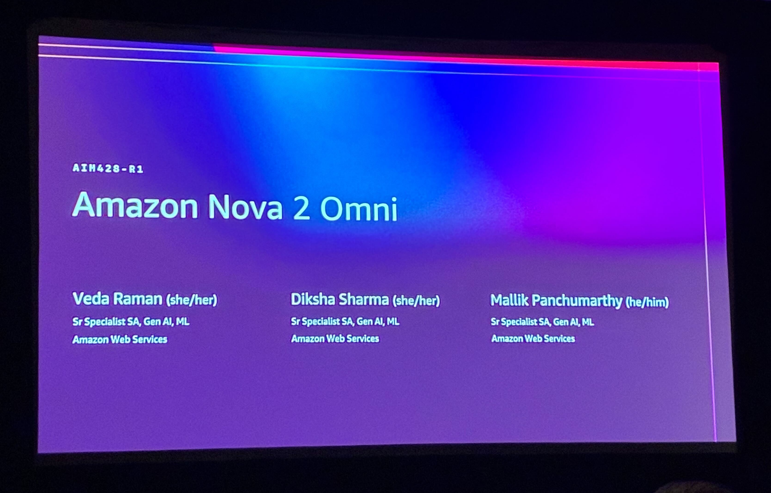
Keynoteでも取り上げられていたAWSの新しいAIモデルである「Amazon Nova 2 Omni」を最速で触ってきました。
Nova 2シリーズ
ワークショップの内容に入る前に、新しいAIモデルであるAmazon Nova 2シリーズについて簡単にご紹介します。
新しく発表されたモデルは計4種類あり、それぞれ以下のような特徴があります。
| モデル名 | 入力 | 出力 | 特徴 | ユースケース |
|---|---|---|---|---|
| Nova 2 Lite | テキスト、画像、動画 | テキスト | 応答速度とコスト効率が高い | チャットボットなど |
| Nova 2 Pro | テキスト、画像、動画、音声 | テキスト | 高度で複雑な処理が可能 | 複雑な分析など |
| Nova 2 Sonic | テキスト、音声 | テキスト、音声 | 音声対話に特化 | リアルタイム音声会話など |
| Nova 2 Omni | テキスト、画像、動画、音声 | テキスト、画像 | 高度なマルチモーダル性 | 複数のモダリティ(テキストと画像の出力など)を利用したいとき |
今回は、Nova 2 Omniのワークショップを受講してきました。
※Nova 2 Omniは2026年1月時点ではプレビュー版のみで、Nova Forge利用者および承認済みユーザのみアクセス可能です。
※本記事執筆にあたって使用したAmazon BedrockのModelは2025年12月4日 (UTC-8)に実行し、その時点における次のEnd user license agreement (EULA)に基づいています。
Amazon Nova 2 Omni(us.amazon.nova-2-omni-v1:0): End user license agreement (EULA) (AWS Customer Agreement and Service Terms)
利用方法
ワークショップでは、AWSアカウントとAmazon SageMaker StudioのCode EditorでJupyterLabが準備されており、コードを実行するだけでモデルを体験できました。 以下のようにBedrock Converse APIを使って モデルを呼び出すというシンプルな構成です。
import boto3
from botocore.config import Config
import json

REGION_ID = "us-west-2"
MODEL_ID = "us.amazon.nova-2-omni-v1:0"

bedrock_runtime = boto3.client('bedrock-runtime', region_name=REGION_ID)

request = {
    "modelId": MODEL_ID,
    "messages": [
        {
            "role": "user",
            "content": [
                {
                    "text": "ここにプロンプトを入力する"
                }
            ],
        }
    ],
    "inferenceConfig": {"temperature": 0.5, "maxTokens": 512},
}
response = bedrock_runtime.converse(**request)
response_content_list = response["output"]["message"]["content"]
ワークショップ概要
「Building intelligent multimodal applications with Amazon Nova 2 Omni」というワークショップを受講してきました。 内容はGitHubにも公開されています。
ワークショップは、7つのLabで構成されており、それぞれのLabでマルチモーダル性が感じられる内容となっています。
- テキスト、および画像生成:inputにテキストを利用し、画像を生成します
- 画像編集:inputに画像、テキストを利用し、要素の変更や画像のスタイルの変更を行います
- 会議分析:inputに音声、テキストを利用し、音声の文字起こしや要約、議事録作成を行います
- 動画理解:inputに動画、テキストを利用し、動画の要約や内部で利用しているロゴ・商標などを判別します
- 組み込みシステムツール:Web検索やコード理解を行い、組込みシステムツールの使い方を学びます
- マルチモーダルRAG:画像やテキストコンテンツを埋め込み、ベクトルとして保存し、マルチモーダル検索を行います
- スマート不動産アシスタント:画像分析や市場評価を行い、実際のユースケースに沿った利用を行います
この中でも、7のスマート不動産アシスタントについて深堀りしたいと思います。 ステップ1から順を追って内容を説明します。
Step0:事前準備
この後のStepで利用する、各種エージェントを準備します。
・不動産分析エージェント:物件画像を分析し、部屋の特徴などを特定
Property Analyzer
property_analyzer = Agent(
    model=bedrock_model,
    tools=[image_reader, save_analysis_report],
    system_prompt="""
    You are an expert property analyst. Analyze property images to identify:
    - Room types and layout
    - Condition and maintenance needs
    - Notable features and amenities
    - Potential issues or concerns
    - Estimated square footage and room count

    Provide detailed, professional analysis in JSON format with sections:
    - property_overview
    - room_analysis
    - condition_assessment
    - notable_features
    - recommendations
    """
)
・マーケティングコンテンツ生成エージェント:物件説明やSNS用キャプションなどを作成
Marketing Content Creator
marketing_agent = Agent(
    model=bedrock_model,
    tools=[save_analysis_report],
    system_prompt="""
    You are a real estate marketing expert. Create compelling marketing content including:
    - Engaging property description (150-200 words)
    - Key selling points (bullet format)
    - Social media captions
    - Email marketing copy

    Focus on emotional appeal while highlighting practical benefits.
    Use active voice and compelling adjectives.
    """
)
・不動産評価エージェント:物件データと市場状況を分析
Visual Enhancement Specialist
valuation_agent = Agent(
    model=bedrock_model,
    tools=[get_market_data, save_analysis_report],
    system_prompt="""
    You are a real estate valuation expert. Analyze property data and market conditions to provide:
    - Estimated market value range
    - Pricing strategy recommendations
    - Market positioning advice
    - Competitive analysis

    Consider property condition, features, and local market data.
    Provide conservative and optimistic valuations.
    """
)
・強化画像生成エージェント:特定の条件を満たす強化された物件画像を生成
Market Valuation Specialist
visual_enhancer = Agent(
    model=bedrock_model,
    tools=[generate_image],
    system_prompt="""
    You are a real estate photography expert. Generate enhanced property images that:
    - Showcase the property's best features
    - Use optimal lighting and staging
    - Appeal to target buyers
    - Follow real estate photography best practices
    - Your final line of output must be as follows
    - FINAL DECISION: <path to final decision image>

    """
)
・基本情報:住所などの基本情報
property_info
# Sample property information
property_info = {
    "address": "123 Maple Street, Suburbia",
    "type": "Single Family Home",
    "bedrooms": 3,
    "bathrooms": 2,
    "sqft": 1800,
    "lot_size": "0.25 acres",
    "year_built": 1995
}

print("Property Information:")
print(json.dumps(property_info, indent=2))
Step1:画像生成
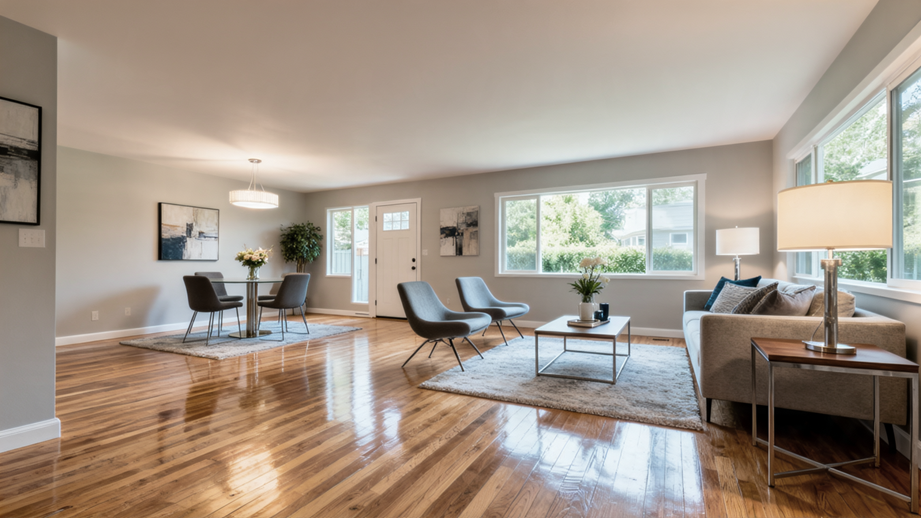
部屋数や部屋のサイズ、部屋のイメージなどを入力し、画像を生成します。
Generate Sample Property Images
# Generate sample property images for analysis
![ -d output ] && rm -rf output
image_prompt = f"""
Create a realistic interior photo of a {property_info['type']} with {property_info['bedrooms']} bedrooms.
Show a modern, well-lit living room with hardwood floors, large windows, and contemporary furnishing.
Professional real estate photography style.
"""

print("Generating sample property images...")
sample_images = visual_enhancer(image_prompt)
print(f"Generated images: {sample_images}")
available_images = glob.glob('output/*.png')
if available_images:
    for img_path in available_images:
        display(Image(filename=img_path))
else:
    print("No images found in output folder")
"""
実際に以下のような画像が生成されました。
Step2:物件の分析
Step1で作成した画像と事前に設定したproperty_infoより、物件を分析します。
Analyze Property Images
# Analyze the generated property images
image_path = str(sample_images).split("FINAL DECISION: ")[-1].replace('"', '').strip()
print(image_path)
analysis_prompt = f"""
Analyze these property images for: {property_info['address']}
Property details: {json.dumps(property_info)}

Image paths: {image_path}

Provide comprehensive analysis and save as 'property_analysis.json'
"""
print(analysis_prompt)
print("Analyzing property images...")
analysis_result = property_analyzer(analysis_prompt)
print("Analysis completed:")
print(analysis_result)
### Room Analysis

**Observed Spaces:**

1.  **Living Room**
    *   **Dimensions:** Estimated approximately 20' x 15'
    *   **Layout:** Spacious open-concept layout.
    *   **Features:**
        *   Hardwood flooring throughout.
        *   Large wall-mounted art pieces.
        *   Modern pendant lighting fixture hanging from ceiling.
        *   Large picture windows on two walls providing abundant natural light.
        *   Sliding door leading to an exterior space.
        *   Area rug under coffee table and sofa arrangement.
        *   Contemporary sofa set with decorative pillows.
        *   Modern side tables and floor lamp.
Step3:マーケティングコンテンツの生成
Step2の分析結果をもとにマーケティングコンテンツを生成します。 SNS用のキャプションやメール文章なども作成してくれます。
Create Marketing Content
# Generate marketing content based on analysis
marketing_prompt = f"""
Create marketing content for: {property_info['address']}
Property details: {json.dumps(property_info)}
Analysis results: {analysis_result}

Generate comprehensive marketing materials and save as 'marketing_content.txt'
"""

print("Creating marketing content...")
marketing_result = marketing_agent(marketing_prompt)
print("Marketing content created:")
print(marketing_result)
1.  Dream living awaits at 123 Maple Street! ✨ Three bedrooms, two bathrooms, and tons of natural light make this single-family home the perfect place to create memories. Don’t miss out! 🏡 #SuburbiaRealEstate #HomeSweetHome

2.  Looking for a bright, modern home in a peaceful neighborhood? 123 Maple Street offers 1,800 sqft of beautifully maintained space with a private outdoor area—your perfect sanctuary! 🌳☀️ #123MapleStreet #DreamHome

3.  Why wait? Your new home is calling! Step inside 123 Maple Street and experience spacious living, elegant hardwood floors, and abundant natural light. Schedule your tour today! 🗓️🔑 #SuburbiaHomes #MoveInReady

4.  Love where you live! 123 Maple Street combines comfort, style, and a charming 0.25-acre lot perfect for relaxation or family fun. Explore your future home today! 💫 #SuburbiaLiving #FamilyHome
Step4:市場評価
Step2の分析結果をもとに、物件の状態、特徴、地域市場データを考慮した物件評価を行います。
Market Valuation Analysis
# Perform market valuation
valuation_prompt = f"""
Provide market valuation for: {property_info['address']}
Property details: {json.dumps(property_info)}
Property analysis: {analysis_result}

Get market data for the location and provide comprehensive valuation report.
Save as 'valuation_report.txt'
"""

print("Performing market valuation...")
valuation_result = valuation_agent(valuation_prompt)
print("Valuation completed:")
print(valuation_result)
### Pricing Strategy Recommendations

1.  **Ideal Listing Price:** To maximize interest while remaining competitive, a listing price of **$580,000** would position this property in the upper-mid range of the market. This accounts for current trends and the property’s condition.
2.  **Market Entry Timing:** Given the average days on market (25-35 days) and rising trends, listing now will allow the property to benefit from the upward trajectory.
3.  **Value Emphasis in Marketing:**
    *   Highlight excellent condition and modern updates (lighting, flooring, decor).
    *   Emphasize abundant natural light and outdoor access.
    *   Showcase the open-concept living/dining space.
    *   Mention the 0.25-acre lot as an attractive feature for potential outdoor projects or future development (if applicable).
4.  **Negotiation Space:** Setting the price at $580,000 allows for negotiation room while still achieving a strong sale price, potentially nearing the optimistic valuation.
Step5:強化されたマーケティング画像の生成
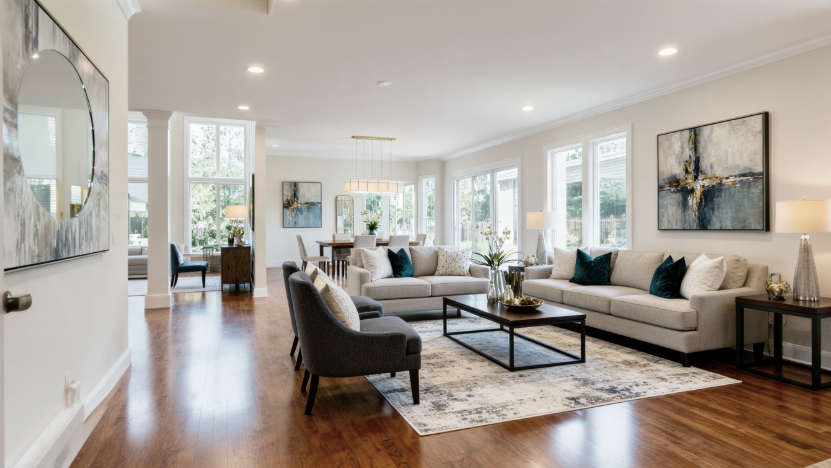
Step2の分析結果をもとに、新たな画像を生成します。
Generate Enhanced Marketing Images
# Generate enhanced marketing images
enhancement_prompt = f"""
Create enhanced marketing images for: {property_info['address']}
Based on analysis: {analysis_result}

Generate 3 professional marketing images:
1. Exterior curb appeal shot
2. Spacious interior living area
3. Modern kitchen with natural lighting

Professional real estate photography style with optimal staging.
"""

print("Generating enhanced marketing images...")
enhanced_images = visual_enhancer(enhancement_prompt)
print(f"Enhanced images created: {enhanced_images}")

available_images = glob.glob('output/*.png')
if available_images:
    for img_path in available_images:
        display(Image(filename=img_path))
else:
    print("No images found in output folder")
Step6:結果のまとめ
これまでの結果をmdファイルに出力し、ワークショップが完了です。
Complete Property Report Generation
# Generate comprehensive property report
report_content = f"""
# COMPLETE PROPERTY REPORT
Generated: {datetime.now().strftime('%Y-%m-%d %H:%M:%S')}

## Property Information
{json.dumps(property_info, indent=2)}

## Analysis Summary
{analysis_result}

## Marketing Content
{marketing_result}

## Valuation Report
{valuation_result}

## Generated Images
Original Analysis Images: {sample_images}
Enhanced Marketing Images: {enhanced_images}

---
Report generated by Smart Real Estate Assistant powered by Amazon Nova
"""

# Save complete report
os.makedirs("output/reports", exist_ok=True)
report_filename = f"complete_property_report_{datetime.now().strftime('%Y%m%d_%H%M%S')}.md"
with open(f"output/reports/{report_filename}", 'w') as f:
    f.write(report_content)

print(f"Complete property report saved: output/reports/{report_filename}")
print("\n" + "="*50)
print("WORKSHOP COMPLETE!")
print("="*50)
終わりに
一つのモデルで非常にたくさんの推論をすることができました。
マルチモーダル性だけでなく、非常に高い画像生成能力も持ち合わせており、様々な用途で使えるモデルかと思います。
これまで複数のモデルを使い分けなければならなかったところが一つで完結するので、効率化できるところも多いかと思います。
2026年1月現在はまだ利用できる人が制限されていますが、GAされればぜひもう一度使ってみたいです。

2025 Japan All AWS Certifications Engineers
趣味で走って跳んでるエンジニア
